Sanity Integration Guide: Frontend, Studio, and Infrastructure
Sanity's integration story is one of the most misunderstood parts of the platform. Not because the docs are bad, but because the word "integration" is doing too much work. It means something different depending on whether you're wiring up a frontend, extending the editing experience in Sanity Studio, or connecting infrastructure like webhooks and deploy pipelines.
We've implemented Sanity across hundreds of B2B websites, and the most productive thing we can do before talking about specific tools is to break down what integration actually means in a Sanity context. If you're evaluating Sanity for a project, scoping a migration, or comparing it against other headless CMS options, this framing will help you ask better questions and get more accurate estimates from your team.
The Three Layers of Sanity Integration
Sanity's architecture is decoupled. The content repository (Content Lake), the editing interface (Sanity Studio), and the frontend (your website or app) are all independent systems that communicate over APIs. That's the whole point of a headless CMS. But it also means "integrates with Sanity" can refer to three very different things.
Layer 1: Frontend Consumption
Your website or application fetches structured JSON from Sanity's Content Lake via API and renders it. When you see "Sanity integrates with Next.js," this is what it means: the Next.js ecosystem has first-party SDKs, live preview hooks, visual editing support, and well-documented patterns for fetching and rendering Sanity content.
The Content Lake is a standard API. Any client that can make HTTP requests can query it. Next.js, Astro, Remix, a React Native app, a static site generator, a server-side script. The real differentiator between frameworks is tooling maturity: how much boilerplate you're writing yourself vs. using maintained libraries.
This is also the layer where most marketing tools live. HubSpot forms, Marketo tracking scripts, analytics pixels. These are frontend concerns. They render on your website regardless of which CMS powers the content. A HubSpot form embedded in a Next.js page works the same whether the page content comes from Sanity, Contentful, or a local JSON file. This distinction matters when scoping work, because "integrate HubSpot with Sanity" might actually mean "embed a HubSpot form on our Sanity-powered site," which is a frontend task, not a CMS task.
Layer 2: Sanity Studio Extensions
Sanity Studio is a React application that you configure and deploy separately from your frontend. Integrations at this layer modify the editing experience: custom input components, plugins, dashboard widgets, workflow automation.
To make this concrete, here's what a custom input component looks like in practice: say your marketing team embeds HubSpot forms across dozens of landing pages. Without a custom input, editors are copying and pasting HubSpot form IDs (or worse, embed codes) into a plain text field. They get it wrong constantly. A custom input component replaces that text field with a dropdown that queries the HubSpot API, shows form names, and stores the correct form ID in Sanity. The editor picks "Q1 Demo Request Form" from a list instead of pasting 12345678-abcd-efgh-ijkl-987654321000. It takes a developer a day or two to build. It saves the content team from broken forms forever.
Other common examples: a color picker that enforces your brand palette, an AI-assisted alt text generator for images, a "related content" field that suggests relevant blog posts based on topic tags, or a Shopify product selector that lets editors pull product data directly into a page without leaving the Studio.
Sanity's plugin ecosystem covers some of this, but integrations specific to your stack require custom development. The Studio is designed to be developer-configured. That's intentional and by design.
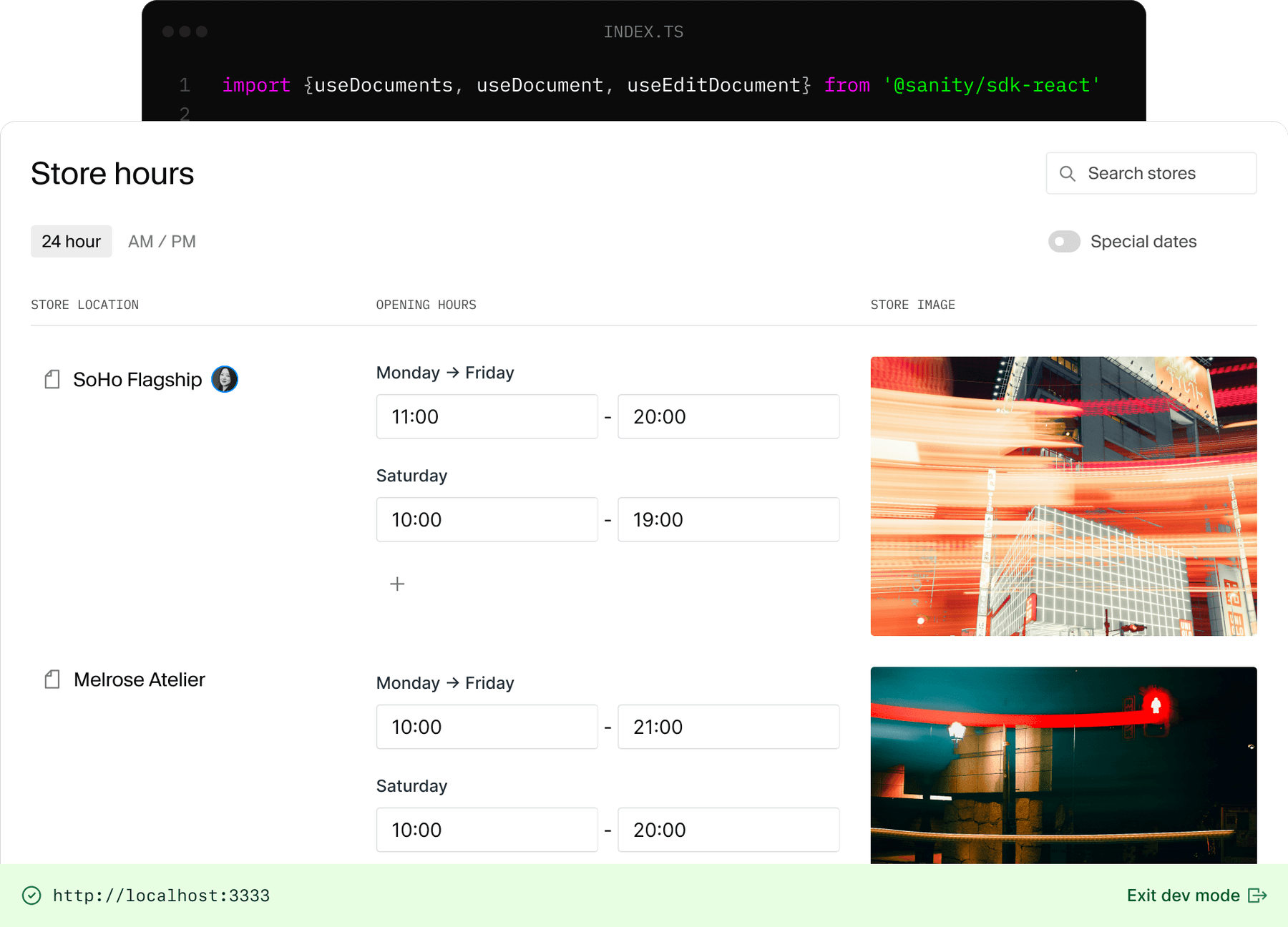
Worth calling out separately: Sanity's App SDK goes beyond Studio plugins. The App SDK lets you build entirely standalone React applications that connect to Sanity's Content Lake with built-in authentication, real-time updates, and collaborative editing. These are separate apps you deploy independently, not things that live inside the Studio.
Studio plugins extend an existing interface. App SDK applications are standalone tools you deploy and use independently. A few examples of what that looks like:
- A localization dashboard that shows translation status across 15 markets in one view, lets regional editors claim and update their locale, and flags stale translations. That's painful to do inside Studio, where you're looking at one document at a time. As a standalone app, it's a purpose-built operations tool.
- A content migration tool with a custom UI for mapping fields from a legacy CMS into Sanity schemas, previewing the output, and running batch imports with rollback support.
- A cross-project content browser for an enterprise with multiple Sanity projects (one per brand or region) that lets a central team search, compare, and share content across all of them from a single interface.
- A campaign launch checklist that pulls content status from Sanity, checks analytics tags, verifies form integrations, and gives a green/red readiness status before a marketing launch.
The App SDK ships with React hooks for live document retrieval, optimistic editing, and permissions checking. Before it existed, building any of these required wiring up authentication, real-time subscriptions, and CRUD operations against the raw API yourself. Now the SDK handles that infrastructure and you focus on the actual tool.
"Custom development" used to be the expensive path. That's not really true anymore. AI-assisted development has compressed the gap. A team that knows Sanity well can build a purpose-built integration about as fast as you'd configure a generic plugin, and you get something that actually fits your workflow.
Layer 3: Infrastructure and Data Pipelines
Sanity Studio needs to be hosted somewhere. Your frontend needs to be hosted somewhere. Content changes need to trigger rebuilds or cache invalidation. Preview environments need to resolve draft content. These are infrastructure concerns.
When Sanity "integrates with Vercel," it means: Vercel can trigger rebuilds when Sanity content changes via webhooks, Sanity's visual editing tools work with Vercel's preview deployments, and there's a first-party integration in the Vercel marketplace.
This layer also covers data pipelines between Sanity and external systems. Webhooks that sync published content to a data warehouse. Scheduled GROQ queries that feed email personalization engines. Event-driven automation that updates a CRM record when a case study gets published. These integrations don't touch the frontend or the Studio directly. They operate at the infrastructure level.
Mapping Tools to Layers
When you're scoping integration work, the first step is mapping each tool to the right layer. Here's what that looks like for common tools:
| Tool | Frontend | Studio | Infrastructure |
|---|---|---|---|
| HubSpot | Embed forms and tracking scripts on your site | Custom input to select forms by name instead of pasting IDs | |
| Marketo | Embed forms, add Munchkin tracking | Custom input to select forms by name instead of pasting IDs | Webhook pipelines to sync lead data or trigger nurture flows |
| Google Analytics | Add tracking code, fire custom events | Dashboard widget showing page performance metrics on each document | |
| Segment | Instrument data layer in frontend code | Custom input using user traits (name, industry) to personalize content per visitor segment | |
| Mux | Render optimized video with adaptive bitrate streaming | Custom input to browse, preview, and select videos from your Mux library without leaving Studio | |
| Vercel | Deploy triggers via webhooks, preview environments for visual editing | ||
| Statsig | Evaluate feature flags and experiments client-side or during SSR | Schema fields for content variants per experiment | Edge middleware for flag evaluation, exposure event logging |
Some tools only touch one layer. Others span two or three depending on how deep the integration goes. A/B testing and personalization is a good example of this.
Optimizely Web Experimentation is mostly a frontend integration. You drop a script on your site, it runs client-side experiments by swapping DOM elements or redirecting traffic. Sanity doesn't need to know about it. Your editors can't control experiments from the Studio, and there's no infrastructure wiring beyond the script tag. That's fine for basic page-level A/B tests.
Statsig typically touches frontend and infrastructure at minimum. Your frontend code evaluates feature flags and experiment assignments via the Statsig SDK, either client-side or server-side during SSR. On the infrastructure side, you're logging exposure events to Statsig's analytics pipeline, and if you're doing server-side evaluation at the edge, you need middleware or a serverless function handling assignment before the page renders.
Now, if you want editors in Sanity to actually author content variants per experiment (headline A vs. headline B, different hero images per audience segment), that's all three layers. You need schema work in Studio so editors can define variants, frontend logic to resolve which variant to render based on the experiment tool's assignment, and infrastructure to handle the flag evaluation and event logging. That's a meaningfully different scope than just dropping a script tag on the page.
This is why the layer framing matters for scoping. "We want to A/B test with Sanity" can mean very different things depending on where you want the control to live.
Integrations We've Built and Why They Mattered
Most of the highest-impact Sanity integrations we've shipped fall into Layer 2: custom inputs, Studio plugins, and App SDK applications. These are the integrations that change how people work day to day. Here are a few real examples.
App SDK: Universal Form Builder
This is probably the single most impactful integration we've built across our client base. It's a standalone App SDK application that lets content editors build form UIs directly in Sanity, regardless of which marketing automation platform sits on the backend.
The editor designs the form: field order, labels, multi-step layouts, conditional logic, validation messaging. The form builder outputs a structured form definition that the frontend renders. On the backend, the form data posts to whatever endpoint the marketing ops team configures: HubSpot, Marketo, Salesforce Marketing Cloud, or a custom webhook.
This solves a problem that comes up in every B2B organization we work with. Marketing ops owns the form submission endpoints and lead routing. The web team owns the form UI, user experience, and conversion optimization. Without a tool like this, those two concerns are tangled together inside the marketing automation platform's form builder, which means every form change requires coordination between both teams.
With the form builder in Sanity, the web team can create and iterate on form variations independently: multi-step flows, autofill with known visitor data, form shortening via enrichment, progressive profiling. Marketing ops just points the form at the right endpoint and manages the data on their side. The two workflows are decoupled.
Custom Input: Wistia Video Browser
A simple one, but it removes real friction. Instead of editors going to Wistia, finding a video, copying the video ID, switching to Sanity, and pasting it into a text field (inevitably getting it wrong sometimes), this custom input lets them browse their entire Wistia library from within the Studio. They see thumbnails, titles, and durations. They click the video they want. The correct ID gets stored in Sanity.
It's maybe two days of development work. It eliminates an entire category of support tickets from editors embedding the wrong video or mistyping an ID.
Custom Input: Searchable Icon Selector
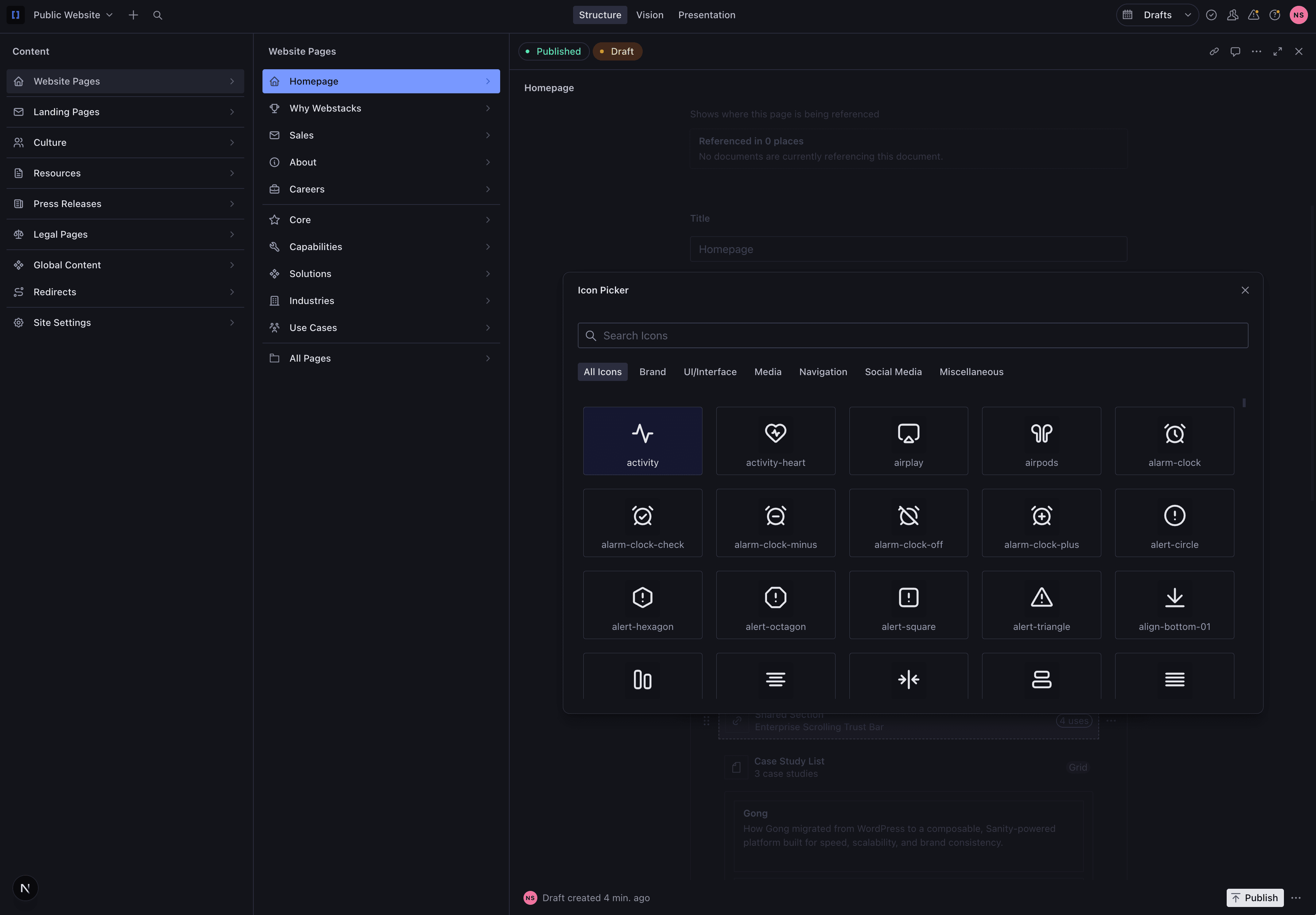
We maintain a global SVG sprite file for icons across the site. The icon selector input connects to that sprite and gives editors a searchable, visual grid of every available icon. They type "arrow" or "check" and see matching options. No guessing icon names, no looking up class names in a spreadsheet, no broken icons in production because someone typed chevron-right.
This kind of integration is small in scope but high in daily quality-of-life for anyone working in the Studio. It's the type of thing that makes editors trust the system instead of working around it.
Why These Integrations Matter More Than Platform Connectors
There's a pattern here. The integrations that deliver the most value aren't the ones that connect Sanity to external platforms at the API level. They're the ones that give the people using Sanity Studio a better interface for doing their actual work.
A webhook that syncs data to Salesforce is necessary infrastructure. A form builder that lets editors ship conversion-optimized forms without filing a dev ticket is what actually changes how fast a team operates. The platform connectors are plumbing. The Studio-level integrations are where teams feel the difference.
How Sanity's Content Lake Architecture Works
The reason Sanity supports integration at all three layers is its content model. Traditional CMS platforms store content inside page templates, coupled to a single rendering context. Sanity stores everything as structured JSON documents in its Content Lake. Content is format-agnostic. It doesn't know or care where it ends up.
Product specifications authored once can populate website pages, feed CRM fields, generate email campaigns, and sync to mobile applications. No duplication between systems.
Three core capabilities power this:
GROQ querying. Sanity's query language lets you request exactly the content shape you need. Your frontend can ask for just the title and hero image of 50 blog posts. Your email system can ask for the full body of one. Same content, different projections, different consumers.
Webhooks. When content changes in Sanity, webhooks notify external systems immediately. This is how you trigger Vercel rebuilds, invalidate CDN caches, sync data to Salesforce, or kick off email workflows. Basic webhook configuration happens through the Sanity management dashboard. More complex routing (filtering by document type, conditional triggers) can be handled with a lightweight serverless function.
Live Content API. For applications that need real-time updates without polling. This powers live preview in the Studio, but it's available to any client that needs to subscribe to content changes as they happen.
Common Integration Patterns by Category
With the layer model in mind, here's how common tools actually connect to a Sanity-powered stack.
Marketing Automation (HubSpot, Marketo, Pardot)
These are almost always frontend integrations. You're embedding forms, adding tracking scripts, and firing conversion events from your website. Sanity isn't directly involved.
Where it gets more interesting is at the Studio layer. HubSpot has a listing on Sanity's Exchange marketplace, but "integration" in this context means basic connectivity, not a turnkey solution. If you want editors to select HubSpot forms from within Sanity (instead of pasting IDs), that's a custom Studio input. If you want content changes in Sanity to trigger Marketo campaigns via webhook, that's infrastructure.
Pardot and Salesforce Marketing Cloud follow the same pattern. No official Sanity plugins. You're either embedding their forms on the frontend (straightforward) or building custom data pipelines between Sanity and Salesforce (real engineering work, but well-defined).
Analytics (Google Analytics, Segment, Mixpanel)
Analytics tools are frontend integrations. You instrument your website with tracking code. The data layer lives in your frontend application, not in Sanity.
Google Analytics has an official Sanity integration for basic event tracking configuration. Segment and Mixpanel don't have official plugins, but they don't need them. You implement them in your frontend codebase the same way you would with any other CMS or no CMS at all.
Where Sanity adds value here is content attribution. Because Sanity's Content Lake is structured and queryable, you can enrich your analytics with content metadata: which author, topic, content type, or campaign a page belongs to. That's a data pipeline integration (Layer 3), not something you configure in a dashboard.
Frontend Frameworks
Next.js is the strongest Sanity integration by a wide margin. First-party SDKs, visual editing with live preview, ISR and on-demand revalidation via webhooks, and a large community producing patterns and examples. If you're building a content-heavy site on Sanity, Next.js is the default choice unless you have a specific reason to go elsewhere.
Sanity also officially supports Astro, Remix, Svelte, Vue 3, Gatsby, Eleventy, and Angular. The tooling maturity varies. Astro and Remix have solid support. Gatsby's relevance has declined. The others work but expect to write more boilerplate for things like preview and visual editing that come out of the box with Next.js.
How Good Integrations Change the Editing Experience
The integration architecture is a developer concern. But the reason you're building it is so that everyone else can work without filing tickets.
Visual Editing and Preview
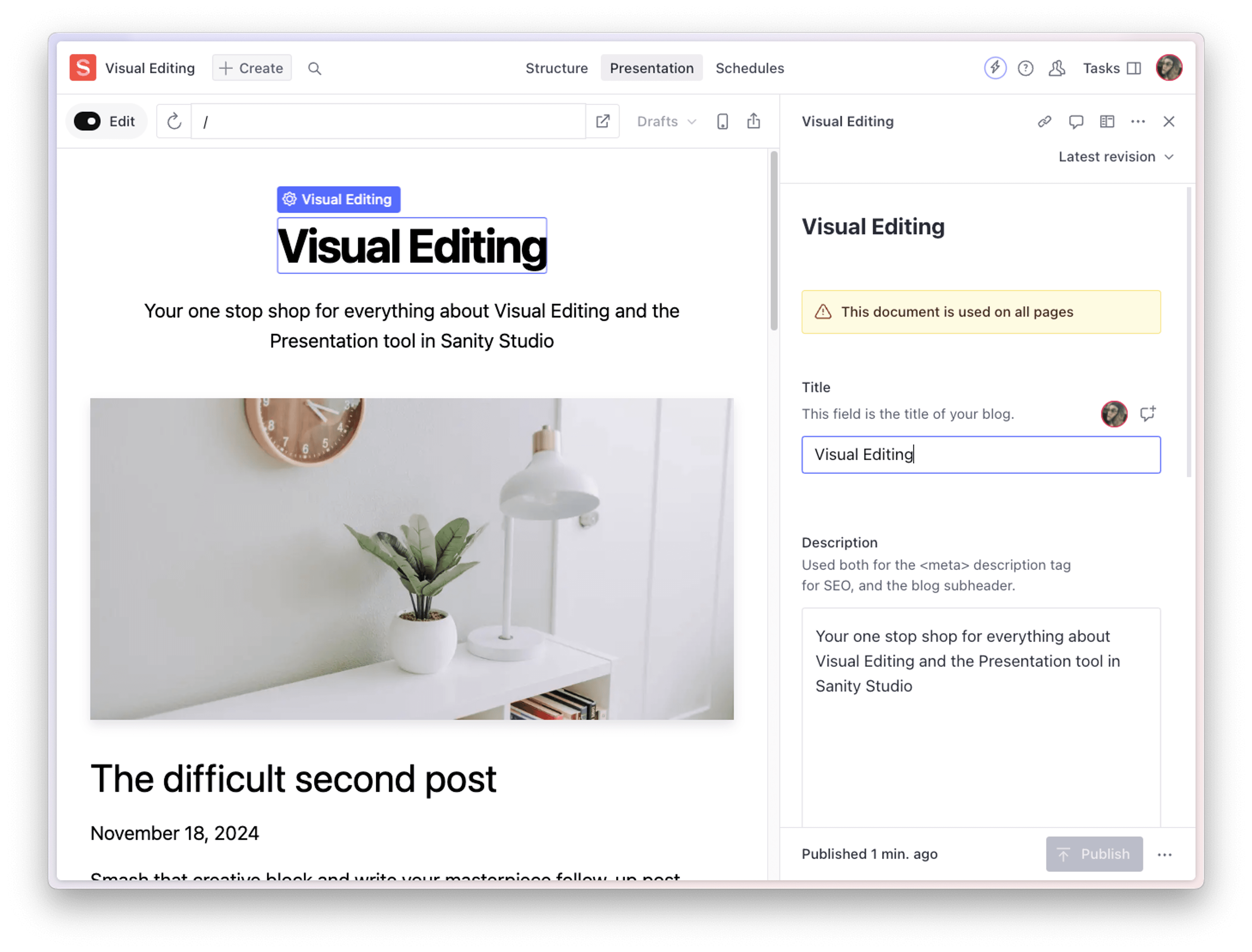
Sanity's visual editing lets editors click directly on elements in a live preview of the production site and edit them in context. This isn't a static preview pane. It's your actual site, rendered with draft content, updating in real time as you type. Multiple editors can collaborate simultaneously.
Worth noting: this is an infrastructure integration (Layer 3) that most teams underestimate when scoping. You need preview environments that resolve draft content, and your frontend needs to support Sanity's visual editing overlay. On Next.js with Vercel, the setup is well-documented. On other stacks, expect more configuration work.
Schema-Driven Guardrails
Sanity's schema system lets developers define exactly what editors can and can't do. Required fields, validation rules, constrained options, structured content models. Editors get full autonomy within those boundaries. They publish without a developer in the loop. They can't accidentally break the site because the schema prevents invalid states.
This is worth understanding when evaluating Sanity against more "flexible" CMSs. Less flexibility at the editing layer is a good thing when it means fewer broken pages and faster publishing.
Choosing Sanity for Your Stack
Sanity's integration model is different from traditional CMS platforms. There's no marketplace with hundreds of one-click plugins that bolt features onto a monolithic system. Instead, you get a content infrastructure layer (the Content Lake) that your team connects to whatever systems make sense for your stack, at whatever depth makes sense for your workflow.
That's a tradeoff. You get flexibility and control. You also get responsibility for making the connections work. For teams with development resources and a clear content architecture, that tradeoff pays off quickly. For teams expecting a WordPress-style plugin ecosystem, the expectations need to be set differently.
The teams we see get the most out of Sanity are the ones that invest in getting the content model and integration architecture right early, then let editors operate independently within that structure. The CMS becomes infrastructure, not a bottleneck.
If you're evaluating Sanity for an upcoming project or planning integrations for an existing Sanity instance, we're happy to talk through it.

I founded Webstacks to help B2B tech companies build websites that actually perform. I'm passionate about bridging strategy, design, and engineering to create scalable web experiences.